SwiftUI Patterns
Multi-Filter Product Lists
May 22, 2026
5 min read
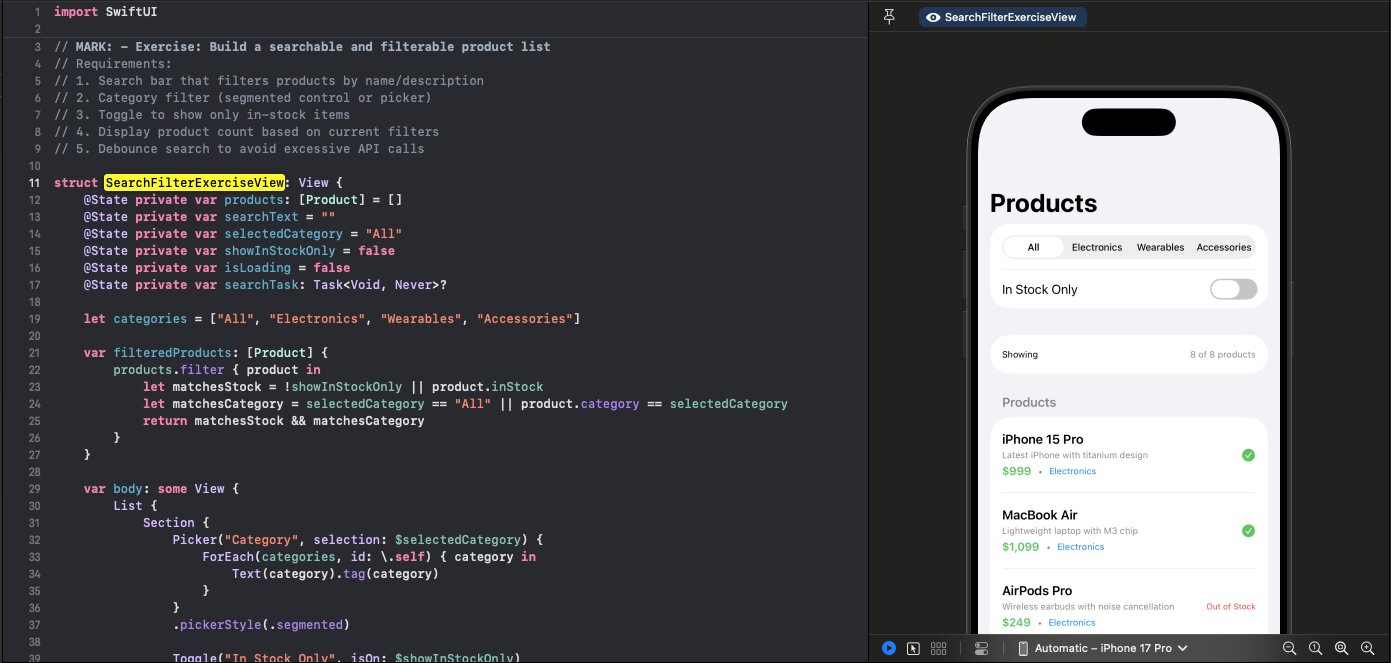
Combine text search with category filters and toggles. Here's how to build a multi-filter product list.
Follow along with the code: iOS-Practice on GitHub
The Complete View
struct SearchFilterExerciseView: View {
    @State private var products: [Product] = []
    @State private var searchText = ""
    @State private var selectedCategory = "All"
    @State private var showInStockOnly = false
    @State private var isLoading = false
    @State private var searchTask: Task<Void, Never>?

    let categories = ["All", "Electronics", "Wearables", "Accessories"]

    var filteredProducts: [Product] {
        products.filter { product in
            let matchesStock = !showInStockOnly || product.inStock
            let matchesCategory = selectedCategory == "All" || product.category == selectedCategory
            return matchesStock && matchesCategory
        }
    }

    var body: some View {
        List {
            Section {
                Picker("Category", selection: $selectedCategory) {
                    ForEach(categories, id: \.self) { category in
                        Text(category).tag(category)
                    }
                }
                .pickerStyle(.segmented)

                Toggle("In Stock Only", isOn: $showInStockOnly)
            }

            Section {
                HStack {
                    Text("Showing")
                    Spacer()
                    Text("\(filteredProducts.count) of \(products.count) products")
                        .foregroundColor(.secondary)
                }
                .font(.caption)
            }

            Section("Products") {
                if isLoading {
                    HStack {
                        Spacer()
                        ProgressView()
                        Spacer()
                    }
                } else if filteredProducts.isEmpty {
                    ContentUnavailableView.search(text: searchText)
                } else {
                    ForEach(filteredProducts) { product in
                        ProductRowView(product: product)
                    }
                }
            }
        }
        .searchable(text: $searchText, prompt: "Search products...")
        .onChange(of: searchText) { _, newValue in
            performSearch(query: newValue)
        }
        .navigationTitle("Products")
        .task {
            await loadProducts()
        }
    }
}
Local vs Server Filtering
Server-side (search): Debounced API calls
.onChange(of: searchText) { _, newValue in
    performSearch(query: newValue) // Calls API
}
Client-side (category/stock): Computed property
var filteredProducts: [Product] {
    products.filter { product in
        let matchesStock = !showInStockOnly || product.inStock
        let matchesCategory = selectedCategory == "All" || product.category == selectedCategory
        return matchesStock && matchesCategory
    }
}
Category and stock filters work instantly on cached data.
Filter Controls
Segmented Picker
Picker("Category", selection: $selectedCategory) {
    ForEach(categories, id: \.self) { category in
        Text(category).tag(category)
    }
}
.pickerStyle(.segmented)
Toggle
Toggle("In Stock Only", isOn: $showInStockOnly)
Showing Filter Results
Display count relative to total:
Section {
    HStack {
        Text("Showing")
        Spacer()
        Text("\(filteredProducts.count) of \(products.count) products")
            .foregroundColor(.secondary)
    }
    .font(.caption)
}
Product Row
struct ProductRowView: View {
    let product: Product

    var body: some View {
        HStack {
            VStack(alignment: .leading, spacing: 4) {
                Text(product.name)
                    .font(.headline)

                Text(product.description)
                    .font(.caption)
                    .foregroundColor(.secondary)
                    .lineLimit(1)

                HStack {
                    Text("$\(product.price, specifier: "%.0f")")
                        .fontWeight(.semibold)
                        .foregroundColor(.green)

                    Text("•")
                        .foregroundColor(.secondary)

                    Text(product.category)
                        .font(.caption)
                        .foregroundColor(.blue)
                }
            }

            Spacer()

            if product.inStock {
                Image(systemName: "checkmark.circle.fill")
                    .foregroundColor(.green)
            } else {
                Text("Out of Stock")
                    .font(.caption2)
                    .foregroundColor(.red)
            }
        }
    }
}
Interview Tip
This pattern shows understanding of when to filter locally (fast, small datasets) vs server-side (large datasets, complex queries).