Task Cancellation: The Cooperative Contract
You call task.cancel(). The task keeps running. What gives?
Follow along with the code: iOS-Practice on GitHub
The Misconception
Many developers expect cancel() to kill a task immediately. It doesn't. Swift's task cancellation is cooperative—the task must check for cancellation and stop itself.
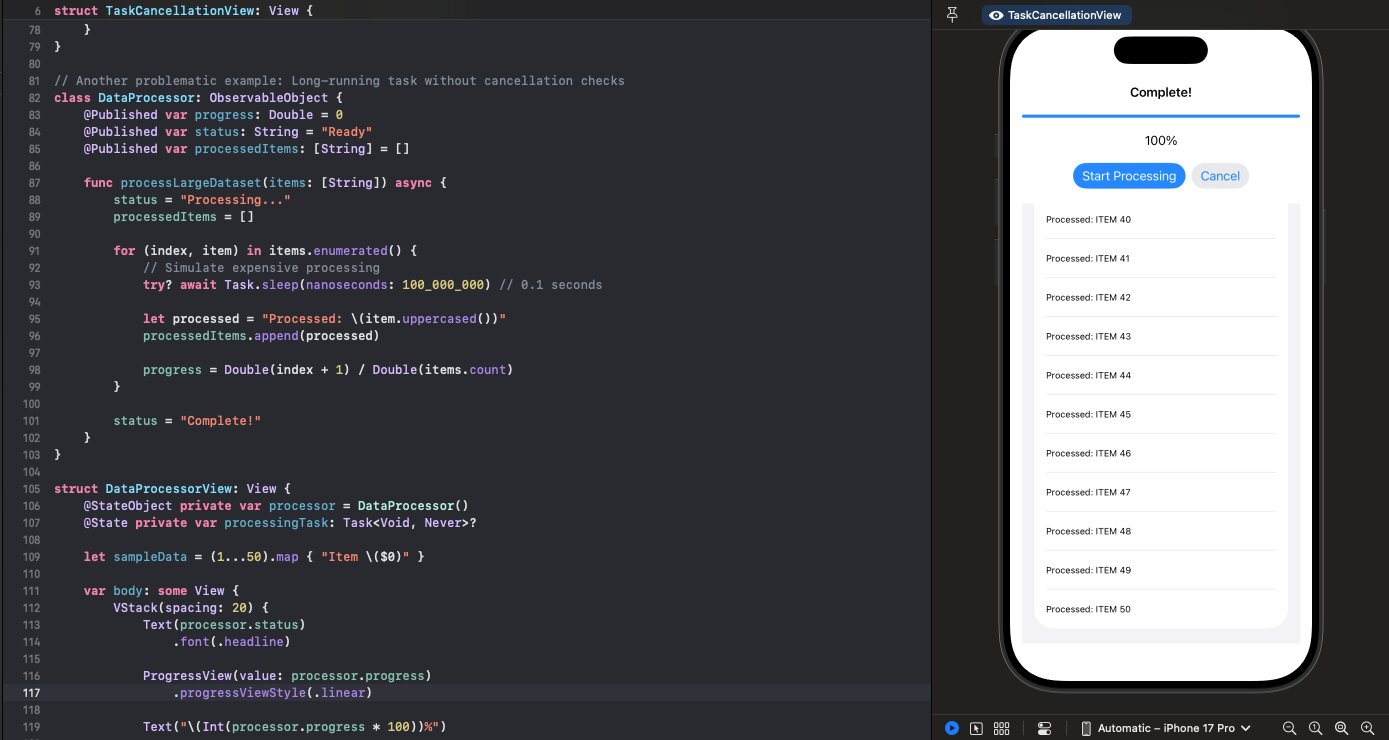
class DataProcessor: ObservableObject {
    @Published var progress: Double = 0
    @Published var processedItems: [String] = []

    func processLargeDataset(items: [String]) async {
        for (index, item) in items.enumerated() {
            // Simulate expensive processing
            try? await Task.sleep(nanoseconds: 100_000_000)

            let processed = "Processed: \(item.uppercased())"
            processedItems.append(processed)
            progress = Double(index + 1) / Double(items.count)
        }
    }
}

// In the view
Button("Cancel") {
    processingTask?.cancel()  // Does nothing visible!
}
The user taps Cancel. The progress bar keeps moving. All 50 items get processed. The cancel was ignored.
Why Cooperative?
Swift could forcibly terminate tasks, but that would be dangerous. What if the task is:
- Holding a lock?
- Writing to a file?
- In the middle of a network transaction?
Forced termination could leave your app in an inconsistent state. Cooperative cancellation lets the task clean up properly.
Checking for Cancellation
Tasks must explicitly check if they've been cancelled:
func processLargeDataset(items: [String]) async {
    for (index, item) in items.enumerated() {
        // Check before each iteration
        if Task.isCancelled {
            return  // Exit gracefully
        }

        try? await Task.sleep(nanoseconds: 100_000_000)

        let processed = "Processed: \(item.uppercased())"
        processedItems.append(processed)
        progress = Double(index + 1) / Double(items.count)
    }
}
Now when Cancel is tapped, the next loop iteration sees Task.isCancelled is true and exits.
How Does Task.isCancelled Know Which Task to Check?
Task.isCancelled is a static property—you don't pass the task around. So how does it understand the scope?
It's not the async keyword itself. It's that async code always runs inside a Task, and the Swift runtime tracks that context implicitly through task-local storage. The runtime knows which Task is currently executing on each thread/continuation.
When you call Task.isCancelled, it essentially does Task.current?.isCancelled ?? false—querying the current task context without you needing to pass anything around.
This is why it only works in async contexts—in synchronous code, there's no current task to query.
Throwing on Cancellation
For cleaner control flow, use Task.checkCancellation():
func processLargeDataset(items: [String]) async throws {
    for (index, item) in items.enumerated() {
        try Task.checkCancellation()  // Throws CancellationError

        try await Task.sleep(nanoseconds: 100_000_000)

        processedItems.append("Processed: \(item.uppercased())")
        progress = Double(index + 1) / Double(items.count)
    }
}
checkCancellation() throws CancellationError if cancelled. The try propagates it up, unwinding the call stack cleanly.
Note: Task.sleep already checks for cancellation and throws. That's why we changed from try? to try—we want the cancellation to propagate.
The Contract
When you write async code, you're entering a contract:
- Check cancellation at reasonable intervals
- Propagate cancellation by not swallowing errors with
try? - Clean up before returning when cancelled
"Reasonable intervals" depends on your work. For a loop processing items, check each iteration. For a network request, check before and after. The goal: respond to cancellation within a second or two.
Cancellation-Aware APIs
Many Swift concurrency APIs are already cancellation-aware:
// These all throw CancellationError when cancelled:
try await Task.sleep(nanoseconds: 1_000_000_000)
try await URLSession.shared.data(from: url)
try await group.next()

// AsyncSequence iteration respects cancellation:
for await value in stream {
    // Loop exits when task is cancelled
}
If you're using these APIs with try (not try?), cancellation propagates automatically.
Common Mistakes
Swallowing Cancellation
// BAD: try? swallows CancellationError
try? await Task.sleep(nanoseconds: 1_000_000_000)
processNextItem()  // Runs even if cancelled!

// GOOD: Let cancellation propagate
try await Task.sleep(nanoseconds: 1_000_000_000)
processNextItem()
Checking Too Infrequently
// BAD: Only checks at start
func processItems(_ items: [String]) async {
    guard !Task.isCancelled else { return }

    for item in items {  // Could take minutes
        await expensiveOperation(item)
    }
}

// GOOD: Check each iteration
func processItems(_ items: [String]) async {
    for item in items {
        if Task.isCancelled { return }
        await expensiveOperation(item)
    }
}
The Rule
Cancellation is a request, not a command. Your async code must honor the request by checking Task.isCancelled or using try with cancellation-aware APIs. Skip this contract, and your "cancelled" tasks will run to completion.