Unstructured Task Leaks
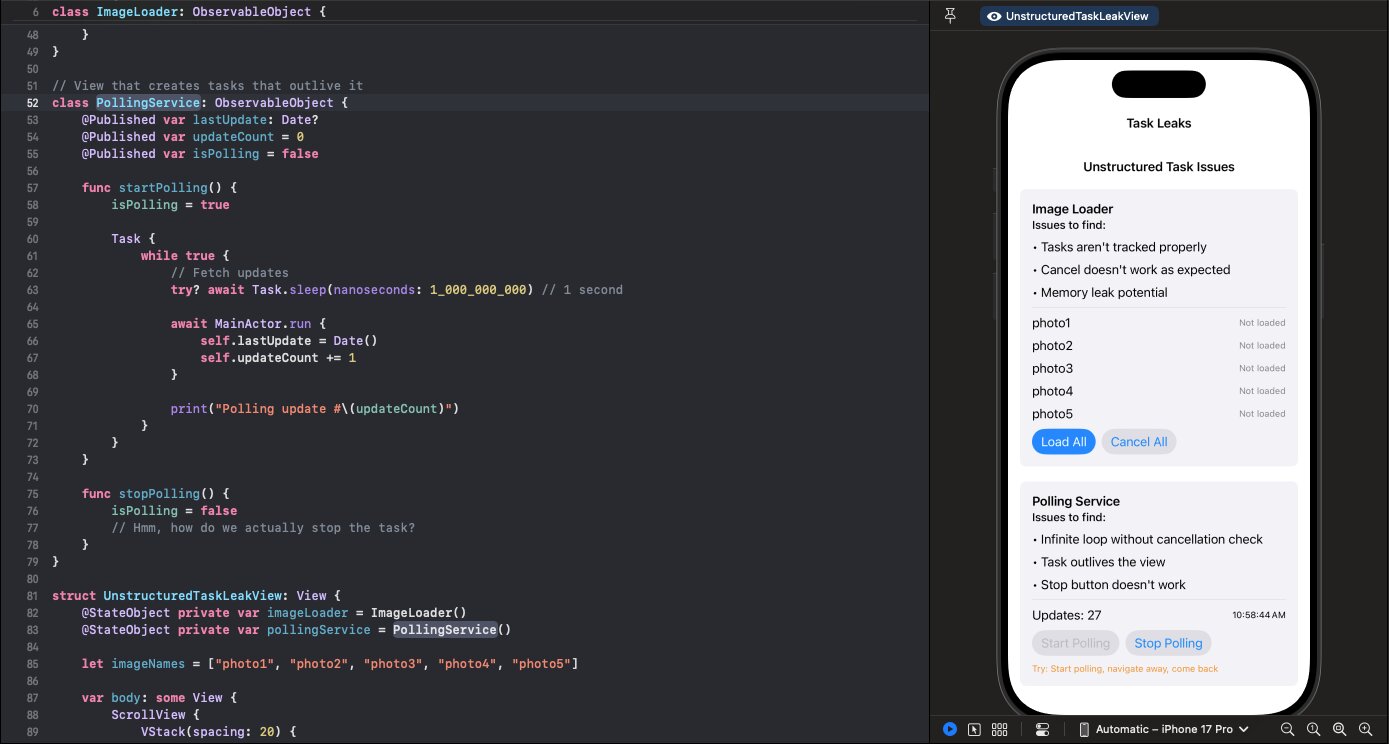
You tap "Cancel All" but the images keep loading. The polling service keeps running after you navigate away. Your tasks have escaped.
Follow along with the code: iOS-Practice on GitHub
The Problem
Here's an image loader that creates tasks but doesn't track them:
class ImageLoader: ObservableObject {
    @Published var images: [String: Data] = [:]
    private var loadTasks: [String: Task<Void, Never>] = [:]

    func loadImage(named name: String) {
        // Creates a task but doesn't store it!
        Task {
            try? await Task.sleep(nanoseconds: 2_000_000_000)
            let imageData = await fetchImage(name)

            await MainActor.run {
                self.images[name] = imageData
            }
        }
    }

    func cancelLoad(named name: String) {
        loadTasks[name]?.cancel()  // loadTasks is empty!
    }
}
The task is created but never stored in loadTasks. When you call cancelLoad, there's nothing to cancel.
Why Tasks Escape
Task { } creates an unstructured task—it runs independently of any parent. Unlike structured concurrency (like async let or TaskGroup), unstructured tasks:
- Don't automatically cancel when their parent scope ends
- Don't prevent the enclosing function from returning
- Must be manually tracked and cancelled
If you don't store the task reference, it's gone. The task keeps running, but you've lost control of it.
The Polling Problem
Even worse is a task that loops forever:
class PollingService: ObservableObject {
    @Published var isPolling = false

    func startPolling() {
        isPolling = true

        Task {
            while true {
                try? await Task.sleep(nanoseconds: 1_000_000_000)
                await MainActor.run {
                    self.updateData()
                }
            }
        }
    }

    func stopPolling() {
        isPolling = false
        // The task keeps running!
    }
}
Setting isPolling = false does nothing to the task. It runs forever—even after the view that created it is gone. Navigate away, come back, tap Start again, and now you have two polling tasks.
The Fix: Track Your Tasks
Store task references so you can cancel them:
class ImageLoader: ObservableObject {
    @Published var images: [String: Data] = [:]
    private var loadTasks: [String: Task<Void, Never>] = [:]

    func loadImage(named name: String) {
        // Cancel any existing load for this image
        loadTasks[name]?.cancel()

        // Store the new task
        loadTasks[name] = Task {
            try? await Task.sleep(nanoseconds: 2_000_000_000)

            // Check cancellation before updating
            guard !Task.isCancelled else { return }

            let imageData = await fetchImage(name)

            guard !Task.isCancelled else { return }

            await MainActor.run {
                self.images[name] = imageData
            }
        }
    }

    func cancelLoad(named name: String) {
        loadTasks[name]?.cancel()
        loadTasks.removeValue(forKey: name)
    }

    func cancelAll() {
        loadTasks.values.forEach { $0.cancel() }
        loadTasks.removeAll()
    }
}
The Fix: Check Cancellation in Loops
For long-running tasks, check Task.isCancelled:
class PollingService: ObservableObject {
    @Published var isPolling = false
    private var pollingTask: Task<Void, Never>?

    func startPolling() {
        // Cancel any existing polling
        pollingTask?.cancel()

        isPolling = true

        pollingTask = Task {
            while !Task.isCancelled {
                try? await Task.sleep(nanoseconds: 1_000_000_000)

                guard !Task.isCancelled else { break }

                await MainActor.run {
                    self.updateData()
                }
            }

            await MainActor.run {
                self.isPolling = false
            }
        }
    }

    func stopPolling() {
        pollingTask?.cancel()
        pollingTask = nil
    }
}
Key changes:
- Store the task in
pollingTask - Loop condition is
!Task.isCancelled - Check again after the sleep (cancellation could happen during sleep)
stopPolling()actually cancels the task
View Lifecycle
For tasks tied to a view's lifecycle, cancel in onDisappear:
struct PollingView: View {
    @StateObject private var service = PollingService()

    var body: some View {
        Text("Polling...")
            .onAppear {
                service.startPolling()
            }
            .onDisappear {
                service.stopPolling()
            }
    }
}
Or use .task modifier which handles this automatically:
struct PollingView: View {
    @State private var data: [String] = []

    var body: some View {
        List(data, id: \.self) { Text($0) }
            .task {
                // Automatically cancelled when view disappears
                while !Task.isCancelled {
                    await fetchNewData()
                    try? await Task.sleep(nanoseconds: 1_000_000_000)
                }
            }
    }
}
The Rule
Every Task { } needs a cancellation strategy. Store the reference. Check Task.isCancelled in loops. Cancel on deinit or onDisappear. Unstructured doesn't mean unmanaged.