Building Responsive Search with Debouncing
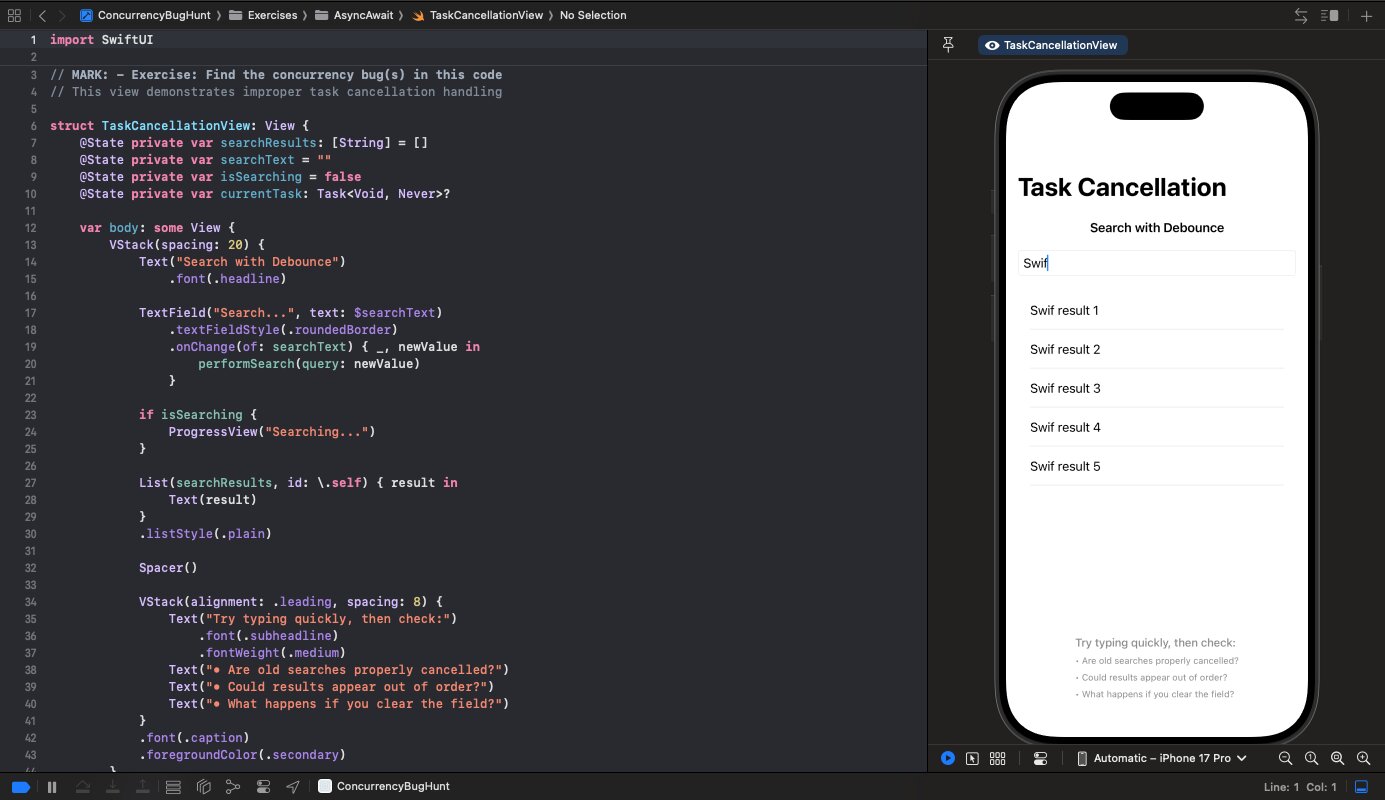
User types "swift". Your app fires searches for "s", "sw", "swi", "swif", "swift". Five API calls for one query. Let's fix that.
Follow along with the code: iOS-Practice on GitHub
The Naive Approach
Here's what most tutorials show:
struct SearchView: View {
    @State private var searchResults: [String] = []
    @State private var searchText = ""
    @State private var currentTask: Task<Void, Never>?

    var body: some View {
        TextField("Search...", text: $searchText)
            .onChange(of: searchText) { _, newValue in
                performSearch(query: newValue)
            }
        // ...
    }

    func performSearch(query: String) {
        currentTask?.cancel()

        currentTask = Task {
            let delay = Double.random(in: 0.5...2.0)
            try? await Task.sleep(nanoseconds: UInt64(delay * 1_000_000_000))

            let results = await fetchResults(for: query)

            await MainActor.run {
                searchResults = results
            }
        }
    }
}
Two problems:
- No debounce: Every keystroke fires a search
- Race condition: Results can arrive out of order
If "swift" returns before "swif" (random delays), you'll show stale results.
Adding Debounce
Wait for the user to stop typing before searching:
func performSearch(query: String) {
    currentTask?.cancel()

    guard !query.isEmpty else {
        searchResults = []
        return
    }

    currentTask = Task {
        // Debounce: wait 300ms for user to stop typing
        try await Task.sleep(nanoseconds: 300_000_000)

        // If we get here, user stopped typing
        let results = await fetchResults(for: query)

        await MainActor.run {
            searchResults = results
        }
    }
}
When the user types a new character:
- Cancel the previous task
- Start a new task with 300ms delay
- If cancelled during the delay (user typed again), the task stops
- If the delay completes, fetch results
Key insight: Task.sleep throws CancellationError when cancelled. By using try instead of try?, the task exits immediately when cancelled.
Handling the Race Condition
Even with debouncing, results can arrive out of order. User searches "cat", then "dog". If "dog" returns first and "cat" returns second, you show cat results for a dog search.
Fix: Check if the query is still current before updating UI:
func performSearch(query: String) {
    currentTask?.cancel()

    guard !query.isEmpty else {
        searchResults = []
        return
    }

    currentTask = Task {
        try await Task.sleep(nanoseconds: 300_000_000)

        // Check cancellation before network call
        try Task.checkCancellation()

        let results = await fetchResults(for: query)

        // Check cancellation before updating UI
        try Task.checkCancellation()

        await MainActor.run {
            searchResults = results
        }
    }
}
Now if the user types a new query while results are fetching, the old task is cancelled and won't update the UI.
The Complete Pattern
struct SearchView: View {
    @State private var searchResults: [String] = []
    @State private var searchText = ""
    @State private var isSearching = false
    @State private var currentTask: Task<Void, Never>?

    var body: some View {
        VStack {
            TextField("Search...", text: $searchText)
                .textFieldStyle(.roundedBorder)
                .onChange(of: searchText) { _, newValue in
                    performSearch(query: newValue)
                }

            if isSearching {
                ProgressView()
            }

            List(searchResults, id: \.self) { result in
                Text(result)
            }
        }
    }

    func performSearch(query: String) {
        currentTask?.cancel()

        guard !query.isEmpty else {
            searchResults = []
            isSearching = false
            return
        }

        isSearching = true

        currentTask = Task {
            do {
                // Debounce
                try await Task.sleep(nanoseconds: 300_000_000)

                // Fetch
                let results = await fetchResults(for: query)

                // Update UI if not cancelled
                try Task.checkCancellation()
                await MainActor.run {
                    searchResults = results
                    isSearching = false
                }
            } catch {
                // Task was cancelled - do nothing
                // Next search will handle isSearching
            }
        }
    }

    func fetchResults(for query: String) async -> [String] {
        // Your actual API call here
        try? await Task.sleep(nanoseconds: 500_000_000)
        return (1...5).map { "\(query) result \($0)" }
    }
}
Why This Works
- Debounce: 300ms sleep before searching
- Cancellation: Previous task cancelled on new input
- Race prevention:
checkCancellation()before UI update - Clean errors: Cancellation caught and ignored (it's expected)
Tuning the Debounce
300ms is a common default. Adjust based on:
- API cost: Expensive APIs might warrant 500ms
- User expectation: Autocomplete feels sluggish above 400ms
- Typing speed: Fast typists benefit from longer debounce
Interview Note
This pattern demonstrates understanding of:
- Task cancellation (cooperative model)
- Race conditions in async code
- User experience considerations
If asked "how would you implement search?", walk through each problem and its solution. The naive approach, why it breaks, and how debounce + cancellation fix it.